
Guide · Updated
How to install a 52Pi ICE Tower on a Bitaxe Gamma 601/602
Install steps for the Bitaxe 52Pi ICE Tower Heatsink Adapter on the Bitaxe Gamma 601 and Bitaxe Gamma 602, with a 52Pi ICE Tower. Coolers, fans and miners are sold separately.
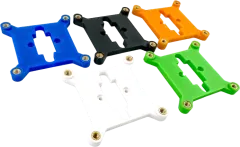
Bitaxe 52Pi ICE Tower Heatsink Adapter
For the Bitaxe Gamma 601 and Bitaxe Gamma 602 · View part: Bitaxe 52Pi ICE Tower Heatsink Adapter
You’ll need
- Cooler52Pi ICE Tower (Raspberry Pi 4/5 version)
Cooler, fan and miner are not included.
In the package
- 1×printed adapter plate
- 4×heat-set brass inserts (installed)
- 4×stainless screws
- 4×plastic washers
Steps
- Remove the stock Bitaxe heatsink and clean the ASIC.
- Apply fresh thermal paste.
- Screw the adapter to the Bitaxe mounting holes with the included screws and plastic washers.
- Seat the ICE Tower and tighten evenly.
Need a hand?
Not sure this cooler fits your miner? Check the compatibility chart. Stuck on a step? Send us a message and we’ll reply, usually within one business day.