
Guide · Updated
How to install an Argon THRML 60mm Radiator on a Bitaxe Gamma 601/602
Install steps for the Argon THRML Radiator Adapter, Argon THRML 60mm Fan Adapter and Argon THRML Radiator + Fan Combo on the Bitaxe Gamma 601 and Bitaxe Gamma 602, with an Argon THRML 60mm. Find your part below and follow its steps. Coolers, fans and miners are sold separately.
Which part do you have?
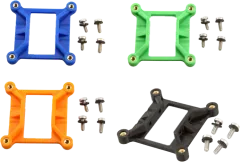
Argon THRML Radiator Adapter
For the Bitaxe Gamma 601 and Bitaxe Gamma 602 · View part: Argon THRML Radiator Adapter
You’ll need
- CoolerArgon THRML 60mm radiator heatsink
Cooler, fan and miner are not included.
In the package
- 1×printed radiator adapter plate
- 4×heat-set brass inserts (installed)
- 4×stainless screws with plastic washers
Steps
- Power down the Bitaxe, remove the stock heatsink and clean the old thermal paste off the ASIC.
- Apply fresh thermal paste.
- Fasten the adapter to the Bitaxe mounting holes with the included screws and washers, tightening evenly in a cross pattern.
- Seat the Argon THRML and secure it to the adapter.
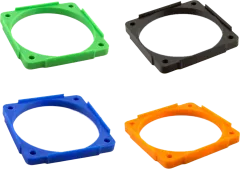
Argon THRML 60mm Fan Adapter
For the Bitaxe Gamma 601 and Bitaxe Gamma 602 · View part: Argon THRML 60mm Fan Adapter
You’ll need
- CoolerArgon THRML heatsinks
- FanA 60mm fan, in place of the stock Argon THRML fan
Cooler, fan and miner are not included.
In the package
- 1×printed 60mm fan adapter
Steps
- Remove the stock fan from the Argon THRML.
- Fasten your 60mm fan to the adapter.
- Fit the adapter to the heatsink’s existing mounting holes.
- Plug the fan into the Bitaxe fan header — check the fan’s polarity first.
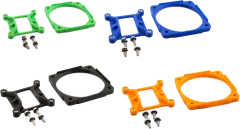
Argon THRML Radiator + Fan Combo
For the Bitaxe Gamma 601 and Bitaxe Gamma 602 · View part: Argon THRML Radiator + Fan Combo
You’ll need
- CoolerArgon THRML 60mm radiator heatsink
- FanA 60mm fan, in place of the stock Argon THRML fan
Cooler, fan and miner are not included.
In the package
- 1×printed radiator adapter plate
- 1×printed 60mm fan adapter
- 4×heat-set brass inserts (installed)
- 4×stainless screws with plastic washers
Steps
- Power down the Bitaxe, remove the stock heatsink and clean the old thermal paste off the ASIC.
- Apply fresh thermal paste.
- Fasten the adapter to the Bitaxe mounting holes with the included screws and washers, tightening evenly in a cross pattern.
- Seat the Argon THRML, then swap its stock fan for your 60mm fan on the fan adapter.
- Plug the fan into the Bitaxe fan header — check the fan’s polarity first.
Need a hand?
Not sure this cooler fits your miner? Check the compatibility chart. Stuck on a step? Send us a message and we’ll reply, usually within one business day.