
Guide · Updated
How to install the NQ-HELIX 120mm Fan Shroud on a NerdQaxe+/++
Install steps for the NQ-HELIX 120mm Fan Shroud on the NerdQaxe+ and NerdQaxe++, with a Thermalright AXP90. Coolers, fans and miners are sold separately.
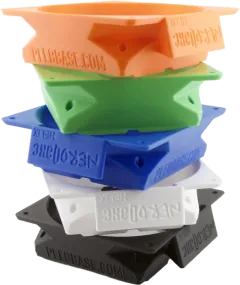
NQ-HELIX 120mm Fan Shroud
For the NerdQaxe+ and NerdQaxe++ · View part: NQ-HELIX 120mm Fan Shroud
You’ll need
- CoolerThermalright AXP90-X36, AXP90-X47, AXP90-X53
- FanA standard 120mm fan
Fan, heat sink and miner are not included.
In the package
- 1×NQ-HELIX 120mm fan shroud
Steps
- Install the Thermalright AXP90 on your NerdQaxe+ or NerdQaxe++.
- Set the NQ-HELIX shroud on the heatsink.
- Fasten a standard 120mm fan to the shroud.
- Plug the fan into the miner’s fan header.
Need a hand?
Not sure this cooler fits your miner? Check the compatibility chart. Stuck on a step? Send us a message and we’ll reply, usually within one business day.